Kioku
Project Overview
Kioku (記憶, meaning "memory") answers a simple question: where do my hours actually go? It runs quietly in your system tray and automatically records which application has your focus and for how long — no timers to start, no buttons to press, no input required. At the end of the day, the week, or the month, you can finally see the truth about how you spent your time.
Everything is stored locally in a SQLite database. Nothing is ever sent to a server.
Core Features
- Automatic tracking — polls every few seconds and logs the app in the foreground; you never have to touch a timer
- Dashboard — daily, weekly, monthly, or custom ranges, with bar charts and a calendar-style usage heatmap
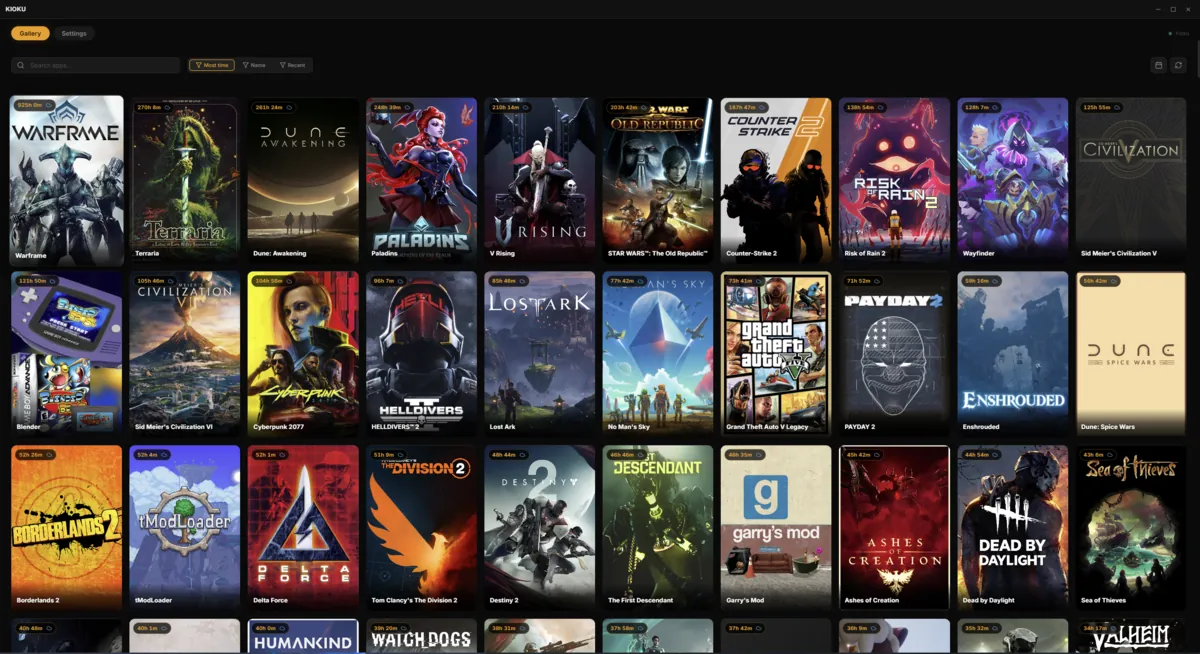
- Gallery — every tracked app and game as a card with cover art; rename entries and assign custom icons
- App groups — organize apps into categories like Browsers, Games, or Dev Tools, with pattern-based auto-grouping
- Blacklist / Whitelist modes — track everything by default, or only what you explicitly allow
- Steam import — pull in your Steam library in one click
- Data export & import — full JSON backup and restore
- Auto-updates — checks GitHub Releases for new versions on launch
Privacy by Design
Time trackers ask you to trust them with an unusually intimate record of your day. Kioku's answer is to keep that record entirely on your machine.
- All data is local — stored in
%APPDATA%\KIOKU\on Windows or~/.config/KIOKU/on Linux - No transmission — nothing leaves your computer except automatic update checks against GitHub
- No surveillance features — it does not record keystrokes, clipboard contents, screenshots, or anything beyond process names and the active window title
Built With
Kioku is a cross-platform desktop app built on Electron, React, and TypeScript, targeting both Windows and Linux. On Linux it ships as an AppImage with working in-app auto-updates, alongside .deb and .tar.gz builds for anyone who prefers their distro's tooling.
Note: The Windows installer is currently unsigned, so SmartScreen may show a warning on first run. Choosing More info → Run anyway is expected until a code-signing certificate is in place.
Why I Built It
I wanted an honest picture of my own time — not a productivity dashboard that guilt-trips me, but a quiet log I could look back on. Manual timers never survive contact with a real workday; you forget to start them, forget to stop them, and the data becomes useless. Automatic tracking removes that friction entirely, and keeping everything local means I can be honest with the data without worrying about who else is reading it.
Try It
Kioku is open-source and available on GitHub, with ready-to-run installers on the releases page. If you have ever wondered where your day disappears to, give it a run for a week — the results are usually surprising.